顯示具有 Firefox 標籤的文章。 顯示所有文章

2009年1月6日 星期二

啟用 IIS 的 SSL 連線

會搞這個是因為新版的 Firefox add-ons 若要啟用更新,更新的描述檔連結用 SSL 加密,因此必須要對 IIS 伺服器加上額外的設定。

若是 add-ons 的更新連結沒有用 SSL 加密的話,建立的 add-ons 上面會出現紅色的驚嘆號,並且出現「未提供經由加密連線的更新」的訊息。

以下內容部分參考How To:在網頁伺服器上設定 SSL

產生憑證要求

  1. 啟動 IIS Microsoft Management Console (MMC) 嵌入式管理單元。
  2. 展開網頁伺服器名稱,並選取要安裝憑證的網站。
  3. 在網站上按一下滑鼠右鍵,再按 [內容]。
  4. 按一下 [目錄安全設定] 索引標籤。
  5. 在 [安全通訊] 中按一下 [伺服器憑證] 按鈕,以啟動 [Web 伺服器憑證精靈]。
  6. 按一下 [建立新憑證],再按 [下一步]。
  7. 按一下 [準備要求,但於稍後傳送],再按 [下一步]。
  8. 在 [名稱] 欄位中鍵入憑證的描述性名稱,並在 [位元長度] 欄位中鍵入金鑰的位元長度,再按 [下一步]。精靈會使用目前網站的名稱作為預設名稱。它並非用於憑證,而是充當協助系統管理員的易記名稱。
  9. 在 [組織] 欄位中鍵入組織名稱 (如 Contoso),並在 [組織單位] 欄位中鍵入組織單位 (如「銷售部門」),再按 [下一步]。此資訊將置於憑證要求中,所以請確定它是正確無誤的。CA 會驗證此資訊並將其置於憑證中。瀏覽網站的使用者會想要查看此資訊,以決定他們是否應該接受憑證。
  10. 在 [公用名稱] 欄位中輸入網站的公用名稱,再按 [下一步]。公用名稱是憑證所有資訊中最重要的資訊之一。它是網站的 DNS 名稱 (即使用者瀏覽網站時鍵入的名稱)。如果憑證名稱與網站名稱不符,則會在使用者瀏覽至該網站時報告憑證問題。如果您的網站位於網路上,且命名為 www.contoso.com,則這就是您應該指定的公用名稱。如果網站位於內部網路,且使用者是以電腦名稱進行瀏覽,請輸入該電腦的 NetBIOS 或 DNS 名稱。
  11. 輸入憑證要求的檔案名稱。

提交憑證要求

  1. 若是並未安裝 Certificate Services,則請先安裝該 service。
  2. 使用 [記事本] 開啟上一個程序所產生的憑證檔案,並將其全部內容複製到剪貼簿上。
  3. 啟動 Internet Explorer,並巡覽至 http://hostname/CertSrv,其中 hostname 是執行「Microsoft 憑證服務」的電腦名稱。
    • 若是在 IIS 中並未存在 CertSrv 目錄,則新增一虛擬目錄,並且將虛擬目錄的來源設定為 C:\WINDOWS\system32\certsrv
    • 若是存取 http://hostname/CertSrv 發生權限問題,請在 IIS MMC 中的 Directory Security 中啟用 Windows authentication 的選項,並且用管理者的帳號及密碼登入。
  4. 按一下 [要求憑證],再按 [下一步]。
  5. 在 [選擇要求類型] 頁面上按一下 [進階要求],再按 [下一步]。
  6. 在 [進階憑證要求] 頁面上按一下 [使用 base64 編碼 PKCS#10 檔案,提交憑證要求],再按 [下一步]。
  7. 在 [提交已儲存的要求] 頁面上按一下 [Base64 編碼憑證要求 (PKCS #10 或 #7)] 文字方塊,再按 CTRL+V,以貼上您先前複製到剪貼簿中的憑證要求。
  8. 在 [憑證範本] 下拉式方塊中按一下 [Web 伺服器]。
  9. 按一下 [提交]。

發行憑證

  1. 從 [系統管理工具] 程式群組中啟動 [憑證授權單位] 工具。
  2. 展開您的憑證授權單位,再選取 [擱置要求] 資料夾。
  3. 選取您剛剛提交的憑證要求。
  4. 在 [執行] 功能表上,指向 [所有工作],再按一下 [發行]。
  5. 確認憑證已顯示在 [發出的憑證] 資料夾中,然後在其上按兩下以檢視之。
  6. 在 [詳細資料] 索引標籤上按一下 [複製到檔案],並將憑證儲存為 Base-64 Encoded X.509 憑證。
  7. 關閉憑證的 [內容] 視窗。
  8. 關閉 [憑證授權單位] 工具。

在網頁伺服器上安裝憑證

  1. 啟動 Internet Information Services (如果它尚未執行的話)。
  2. 展開伺服器名稱,並選取要安裝憑證的網站。
  3. 在網站上按一下滑鼠右鍵,再按 [內容]。
  4. 按一下 [目錄安全設定] 索引標籤。
  5. 按一下 [伺服器憑證],以啟動 [Web 伺服器憑證精靈]。
  6. 按一下 [處理擱置要求及安裝憑證],再按 [下一步]。
  7. 輸入包含 CA 回應的檔案路徑與檔案名稱,再按 [下一步]。
  8. 檢查憑證的概觀,按 [下一步],再按 [完成]。
  9. 憑證現已安裝在網頁伺服器上。

2008年11月27日 星期四

Firefox 書籤工具列消失;或是一片空白

症狀是:
「書籤工具列」顯示時一片空白。

解決方法

工具列上按右鍵→自訂,將「書籤工具列」圖示拖拉到工具列上即可

2008年11月20日 星期四

IE7Pro Compatibility Script

IE7Pro Compatibility Script 將 Firefox 的 GreaseMonkey 語法移植到 IE7 上的 script。直接安裝後即可使用。
支援語法:
  • GM_setValue
  • GM_getValue
  • GM_log
  • GM_openInTab
  • GM_addStyle
  • GM_xmlhttpRequest
// FremyCompany Script
// version 0.1 build 4 ALPHA!
// 28/03/07
//
// --------------------------------------------------------------------
//
// This is a Greasemonkey user script.  To install it, you need
// IE Pro 9.12 or later (see at : http://www.iepro.com)
// Then restart Internet Explorer and revisit this script.
//
// --------------------------------------------------------------------
//
// ==UserScript==
// @name          .FremyCompany Script
// @description   Scripts made by FremyCompany to make IE Pro more compatbile with GreaseMonkey
// @include       *
// ==/UserScript==

(function(w,d) {
    w.GM_setValue=function(name, value) {
        return PRO_setValue(name, value);
    };
    w.GM_getValue=function(name, defaultValue) {
        return PRO_getValue(name, defaultValue);
    };
    w.GM_log=function(text) {
        return PRO_log(text);
    };
    w.GM_openInTab=function(url) {
        return PRO_openInTab(url);
    };
    w.GM_addStyle=function(css) {
        return PRO_addStyle(css);
    };
    w.GM_xmlhttpRequest=function (d) {
        // url, method, headers, data, onload, onerror, onreadystatechange;
        if (!d.url) { GM_log("URL is missing in xhr-call"); return false; }
        if (!d.method) { d.method="POST"; }
        if (!d.headers) { d.headers=new Array(); }
        var xhr={"readyState":0,"status":0,"statusText":"not loaded"};
        var xhr_value=xhr;
        try {
            xhr=GM_xmlhttpRequest._createRequest();
            
            // OPENING of the xhr
            xhr.open(d.method, d.url, true);
            for (h in d.headers) {
                try { xhr.setRequestHeader(h, d.headers[h]); } catch (ex) {}
            }
            
            // CallBack gesture
            xhr.onreadystatechange=function() {
                GM_xmlhttpRequest._createValue(xhr,xhr_value);
                try { d.onreadystatechange(xhr_value); } catch (ex) {}
                if (xhr.readyState==4) {

                    if (xhr.status==200||xhr.status==0) {
                        try { d.onload(xhr_value); } catch (ex) {}
                    } else {
                        try { d.onerror(xhr_value); } catch (ex) {}
                    }
                }
            }
            
            // SENDING the data
            xhr.send(d.data?d.data:null)
        } catch (ex) {
            try { d.onerror(xhr_value, ex); } catch (ex2) {}
        }
    };
    w.GM_xmlhttpRequest._createRequest=PRO_xmlhttpRequest;
    w.GM_xmlhttpRequest._createValue=function(x,v) {
        v.abort=function() { x.abort(); }
        v.getResponseHeader=function(n) { return x.getResponseHeader(n);  }
        v.getAllResponseHeaders=function() { return x.getAllResponseHeaders(); }
        v.responseText=x.responseText;
        v.responseHeaders=x.getAllResponseHeaders();
        v.responseText=x.responseText;
        v.responseBody=x.responseBody;
        v.readyState=x.readyState;
        v.status=x.status;
        v.statusText=x.statusText;
    };
})(window,document);

2008年9月26日 星期五

Firefox 3.0.2 密碼無法使用的 bug

才剛更新完我的 Firefox 3.0.2 馬上就發現問題:Sxipper、PMOG 失效,導因於大部分既存的密碼都無法使用,也無法除儲存新的密碼。依據官方的說法,這導因於 FF 3.0.2 無法讀取包含有非 ASCII 編碼資訊的密碼。

檢查自己是不是碰到這問題的方法很簡單,就是開啟 FF 的錯誤控制台,然後看看是不是有出現:

this._storage is null
...
[Exception... "'Error: Error in getRegisteredUsername: [Exception... "'[JavaScript Error: "this._storage is null" {file: "file:///C:/Program%20Files/Mozilla%20Firefox/components/nsLoginManager.js" line: 425}]' when calling method: ...
之類的錯誤。基本上目前 Mozilla 表示會盡快弄出 patch 檔,然後這段期間要請廣大的使用者自己手動輸入帳號密碼(這真的還蠻囧的)。若是對於密碼苦手的人...只好請你自行將 FF 在倒退嚕回去 FF 3.0.1
目前已知的非官方解法:http://forum.moztw.org/viewtopic.php?p=134732
  1. 到 C:\Users\Your User Name\AppData\Roaming\Mozilla\Firefox\Profiles\XXXXX.default 目錄下(適用於 Vista,XP 應該是 C:\Documents and Settings\Your User Name\Application Data\Mozilla\Firefox\Profiles\XXXXX.default)
  2. 將 signons3.txt 檔轉換成 UTF-8 格式
  3. 重新啟動 Firefox 即可

2008年9月13日 星期六

Google Chrome 的一些使用 tips

  1. 在「上一頁」的按鈕上按下滑鼠右鍵即能顯示最近拜訪過的網頁列表
  2. Crtl+Shift+T 開啟最後一次關閉的分頁
  3. 直接在 address bar 輸入單位換算;比如 1ns in s,會自動利用 Google 計算機進行單位轉換(FF 也支援,只是不見得會利用 Google 計算機)
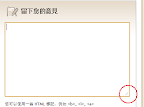
  4. 變大 textarea 如下圖:
    寄件者 HJ@Taipei
其它參考

2008年8月9日 星期六

鄉民低調碼自動還原

裝了這個到 FF 上,就不用再每次猜測 ptt 上的鄉民們在低調甚麼了 :)

安裝後會在 FF 的搜尋引擎中自動加入[鄉民低調碼自動導向]...接著就是把低調碼貼進去就對了

2008年8月5日 星期二

由 Greasemonkey script 直接產生 Firefox extension

參考這個線上工具。將 script 檔

// ==UserScript==

之後的所有原始碼直接貼上,即可產生 xpi 檔。
注意事項

==UserScript== 區塊中請把空白欄位去除。比如

// @include http://www.example.idv/*
// @exclude
^^^^^^^^^^^^^
 移除此欄

2008年7月13日 星期日

常用的 FF 套件

趁著拿到 X61 資料移轉的機會,把我常用的 FF 套件整理如下: Bookmark Tools Developmenet Tools Privacy Information
  • InFormEnter:快速填寫表單
  • Sxipper:好用的密碼管理工具
  • FEBE:FF 設定組態、密碼等備份工具 [參考]
    • CLEO:將 FEBE 備份打包成單一安裝檔

2008年6月28日 星期六

27 PMOG Badges and their corresponding web sites

PMOG

注意用星號標註的項目
Please note the items start with asterisk
* Dorian's Darlings Badge
4 facebook.com urls a day four days out of every seven, four weeks in a row.
* Soul Catcher Badge
4 hits at Flickr.com a day, four days a week, four weeks in a row.
* Space is the Place Badge
3 myspace.com urls a day, four days out of every seven, four weeks in a row.
Bounce Bounce Badge
For players who read Boing Boing every day they're logged on, for 7 contiguous days
VC Badge
For players who read Tech Crunch every day they're logged on, for 7 contiguous days
Champion Badge
Visit http://change-congress.org 3 days a week for two weeks.
Web of Warcraft Badge
Visit http://worldofwarcraft.com, http://thottbot.com, or http://wowinsider.com 3 days a week for two weeks.
Badges. We has them Badge
Visit http://icanhascheezburger.com 5 days a week for two weeks.
Queen Bee Badge
Visit http://perezhilton.com 5 days a week for two weeks.
Thumb Buster Badge
Visit any of kotaku.com, joystiq.com, eurogamer.net or gamespot.com once a week for a month.
KillahOm Badge
Visit http://gigaom.com 5 days a week for two weeks.
Better Than Halo 3 Badge
Visit http://eurogamer.net 5 days a week for two weeks.
Crowd Control Badge
Visit http://massively.com 5 days a week for two weeks.
Dealers Badge
Visit http://digg.com 5 days a week for two weeks.
Great Beast Badge
Visit http://metafilter.com 5 days a week for two weeks.
Lotus Drinkers Badge
Visit http://valleywag.com 5 days a week for two weeks.
Stop Motion Badge
Visit http://reddit.com 5 days a week for two weeks.
Science, It Works Bitches Badge
For players who read xkcd.com once a week for 4 contiguous weeks.
Flying with Radar Badge
Visit dopplr.com once a week for a month.
Little Birdie Badge
Visit twitter.com once a week for a month.
Awrooo! Badge
Visit oreilly.com once a week for a month.
All About Mii Badge
For players who visit nintendo.com more than twice a week for 4 contiguous weeks
Visit jezebel.com on three days of the week for a month.
Achiever Badge
For players who visit xbox360achievements.org and / or live.xbox.com more than twice a week for 4 contiguous weeks
Take Me to Your Readers Badge
Visit io9.com three times a week for a month.
The Red Tent Badge
Visit jezebel.com on three days of the week for a month.
Fun Theory Badge
Visit http://raphkoster.com 2 days a week for two weeks.
* Mesmerized Badge
4 youtube.com urls a day, three days each week, four weeks in a row.